The Complete Guide to Your KDP Recipe Book Interior
Creating a cookbook or recipe journal for Kindle Direct Publishing is an exciting project. The recipes are polished, the photography is ready, and your passion for sharing culinary knowledge is clear. Yet, for many publishers, the final hurdle—the interior layout and design—becomes an unexpected source of stress, delay, and even poor reviews. This is where a thoughtfully crafted Recipe Book Interior template becomes not just a tool, but a strategic partner in your publishing success.
Why a Professional Interior Design Matters More Than You Think
Readers judge a book by its cover, but they experience it through its interior. A recipe book's interior is the functional core of the product. It’s where practicality meets aesthetics. A common misunderstanding is that content alone sells. While your recipes are paramount, their presentation directly impacts usability and perceived value. A cluttered, difficult-to-follow layout can frustrate a user trying to cook your dish, leading to negative feedback, regardless of the recipe's quality. Conversely, a clean, intuitive Recipe Book Interior elevates the entire experience, making your book feel premium and reliable, which encourages those coveted five-star reviews.
Common Pitfalls in DIY Recipe Book Design
Many first-time publishers dive into design software with enthusiasm but without a plan. This often leads to several overlooked errors that compromise the final product.
Sacrificing Function for Decoration
It's easy to get carried away with decorative fonts and elaborate graphics. The primary purpose of a recipe interior is clear communication. A script font for ingredient lists or a faint color for measurements makes the book difficult to use in a busy kitchen. The mistake here is prioritizing "looking pretty" over "working well." The effect is a book that looks nice on a shelf but fails in practical application, damaging user satisfaction.
A better approach: Start with absolute clarity. Use high-contrast, easy-to-read fonts for all recipe text. Ensure headings, lists, and instructions have a clear visual hierarchy. Decorative elements should be reserved for section headers or page borders, never interfering with the recipe itself.
Ignoring Standard Page Specifications
KDP has precise requirements for paperback and hardcover interiors. A frequent error is designing without considering the final trim size (like 8.5x11 inches) or forgetting about "no bleed" specifications. Designing with bleed where it's not needed, or using margins that are too small, can result in rejected files or a printed book where text is cut off or feels cramped. This costs time and requires complete rework.
Practical advice: Always begin your project by confirming KDP's current specifications for your chosen trim size. A professional Recipe Book Interior template is built with these specifications already integrated, so you can design confidently within a safe, pre-defined canvas.
The Time and Tool Trap
Many creators assume they need expensive, complex software like Adobe InDesign to produce a quality interior. This leads to a steep learning curve, significant time investment, and often, a subpar result due to the designer's unfamiliarity with the tool. Alternatively, using basic word processors leads to limited formatting and a generic, unprofessional look. The effect is wasted weeks of effort and a product that doesn't stand out in the marketplace.
The solution: Leverage tools that balance capability with accessibility. A Canva template for your recipe book interior is a perfect example. Canva's free version is remarkably powerful for layout design, and a template provides the expert structure. You save countless hours and avoid software frustration, focusing your energy on customizing the design to fit your brand, not building it from scratch.
What to Look for in a Done-for-You Recipe Interior
Not all templates are created equal. Before downloading or purchasing any KDP recipe book interior, you should evaluate a few key aspects to ensure it meets your needs and quality standards.
- Design Source: Is it created by an experienced KDP publisher? A designer who understands the platform’s nuances will include correct margins, proper pagination, and logical placeholder text for recipes, instructions, and notes.
- Format & Flexibility: You should receive a PDF with clear instructions and a direct link to an editable Canva template. This allows you to see the final product and then easily modify it. Avoid static files that can't be altered.
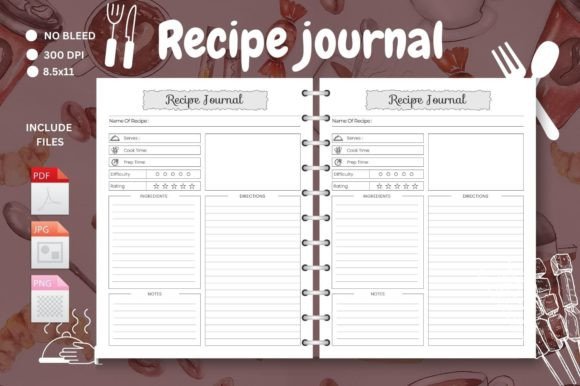
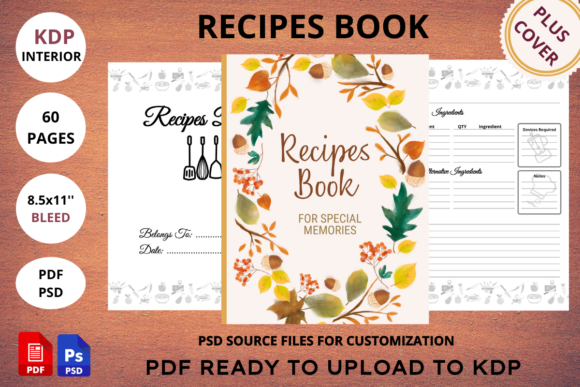
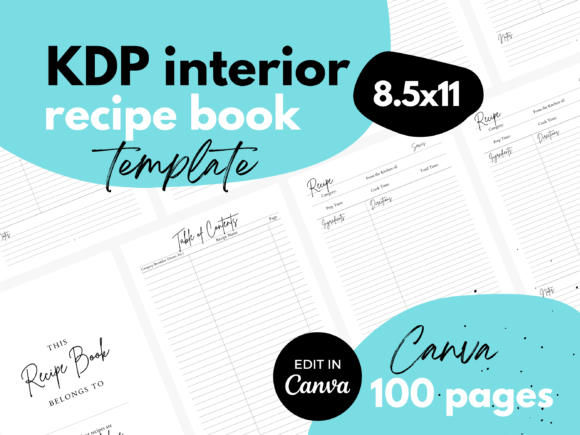
- Comprehensiveness: A good interior template includes all necessary pages: a title page, table of contents, recipe pages (with consistent sections for title, description, ingredients, method, notes, and photo space), and possibly appendix pages for indexes or conversion charts. Check that it’s a complete, cohesive system.
- Style Match: Review the template’s aesthetic. Does its style (modern, rustic, minimalist) align with the theme of your recipe collection? A mismatch will force you into excessive redesign work. The goal is customization, not overhaul.
Implementing Your Template for Maximum Impact
Once you have a high-quality template, using it correctly is the final step. A common oversight is treating the template as a rigid final product rather than a flexible starting point.
Personalization is Key
While the structure is provided, your book needs your voice. Simply filling in the blanks without adjusting colors, fonts, or subtle graphics can result in a book that feels generic. The effect is a lack of brand identity, making it harder to build a loyal reader base.
Do this instead: Use the template's stability to experiment safely. Change the primary color palette to match your theme. Swap in a complementary font pair (keeping readability paramount). Add your logo or a small signature graphic on the title page. This makes the interior uniquely yours while retaining all the professional layout benefits.
Consistency Across All Pages
The template ensures consistency by design, but you must maintain it during editing. A mistake is altering the layout for one recipe page because you have an extra-long ingredient list, then not applying that change to others. This creates visual chaos and confuses the reader.
Better practice: If you need to adjust a element—for example, increasing the space for instructions—apply that adjustment to the master recipe page in your Canva template, then duplicate that updated page for every recipe. This preserves a uniform experience throughout the entire book.
Final Pre-Publication Checklist
Before uploading your interior PDF to KDP, conduct a final review. Open the PDF and simulate the reader's experience.
- Scroll through from start to finish. Is the page order logical?
- Print a single recipe page. Is the text legible? Do the margins look appropriate on paper?
- Check every hyperlink (if any) in the table of contents.
- Ensure all placeholder text has been replaced and no instructional notes from the template remain.
This last quality check, made easy because you started with a robust template, prevents last-minute errors and ensures your Recipe Book Interior is ready to impress readers and support your culinary work flawlessly. By choosing a done-for-you solution, you redirect your energy from frustrating design work to the joyful tasks of recipe creation and marketing, setting your KDP project on a path to success.